


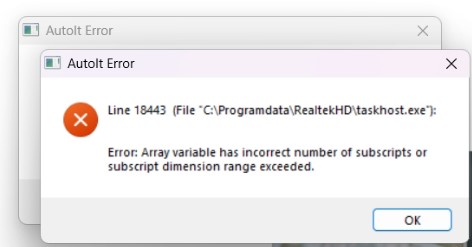
Grey "AutoIt Error" boxes keep popping up on screen, one after another, with a path such as C:\ProgramData\WindowsTask\audiodg.exe or C:\ProgramData\RealtekHD\taskhost.exe. Launching the antivirus gets you nowhere: the scanner window appears and vanishes a second later. This is not a broken sound driver. It is a cryptominer that guards itself, and next to it sits a remote access tool running with the highest privileges in the system.
Below is a breakdown of a real case from our practice: what we found on the laptop, how it hid, how we removed it and how to check your own computer.
Symptoms: what the user sees
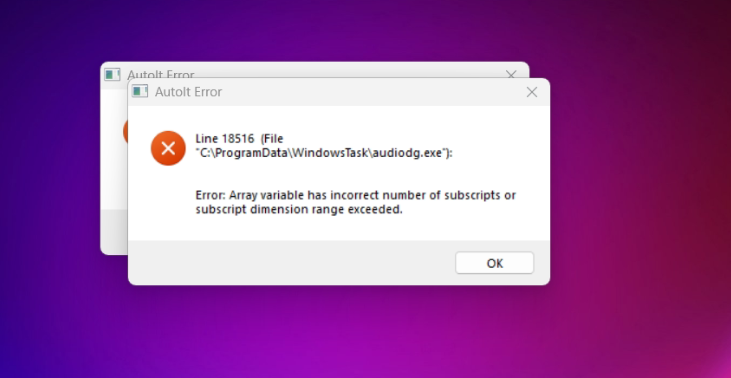
"AutoIt Error" windows with a line number (Line 18516 and Line 18443 in our case) and the text "Array variable has incorrect number of subscripts or subscript dimension range exceeded".
The antivirus or a third-party scanner closes right after it starts.
The fan is loud while the computer is idle and the CPU is busy for no visible reason — that is the miner at work.
Task Manager shows processes with "system" names — audiodg.exe, taskhostw.exe, taskhost.exe — running not from
C:\Windows\System32but fromC:\ProgramData.
The irony of this case: the miner was not running at the time, because its launcher kept crashing. It was the AutoIt Error windows that gave the infection away — without them everything would have run silently.
What it really is: three parts of one scheme
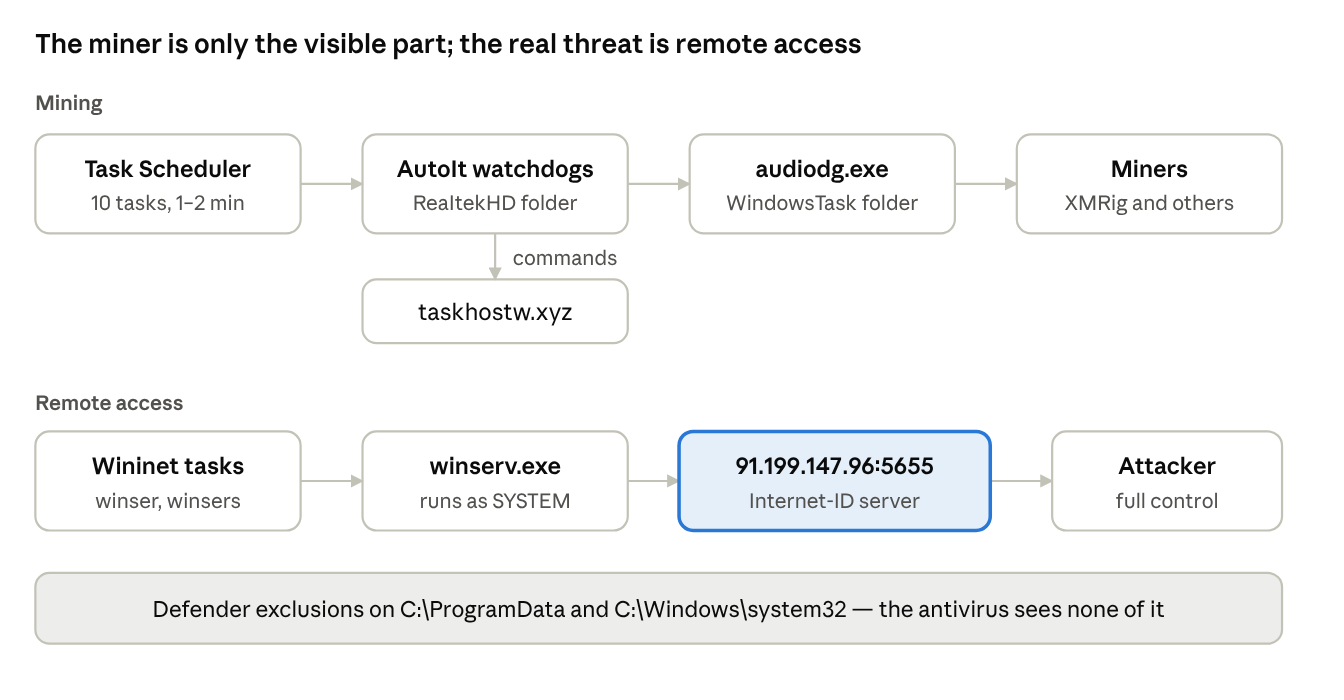
The miner is only the visible part. The real threat is full remote access to the machine. Three components were running on the laptop, each covering for the others.
1. AutoIt watchdogs
C:\ProgramData\ReaItekHD\taskhostw.exe and taskhost.exe. Look closely at the folder name: ReaItekHD, with a capital "I" instead of an "l". In File Explorer you cannot tell it apart from the real Realtek. The watchdogs were started by 10 Task Scheduler tasks — every 1–2 minutes and at logon — plus a "Realtek HD Audio" startup entry. The machine's DNS cache revealed their server: taskhostw.xyz.
2. Miners
The folder C:\ProgramData\WindowsTask\: audiodg.exe (another AutoIt script that launches the rest), MicrosoftHost.exe, AppModule.exe and AMD.exe. In this family MicrosoftHost.exe is XMRig mining Monero, as Joe Sandbox reports identify it. The taskhost.exe watchdog launched audiodg.exe, and that was the one crashing.
3. Remote access
C:\ProgramData\Windows Tasks Service\winserv.exe -second was running as SYSTEM and trying to connect to 91.199.147.96:5655. Port 5655 is what Remote Utilities uses to talk to its Internet-ID server. In other words, this is a renamed host of a legitimate remote control program, pointed at someone else's server. Two more Task Scheduler tasks kept restarting it.
Next to it, the Defender exclusions listed RDP Wrapper — a utility that allows several parallel RDP sessions. With it, someone can work on the machine unnoticed while the user is sitting at it.
Why the antivirus sees nothing
A full scan with the built-in antivirus is pointless here: it simply does not look where the malware lives. And a third-party scanner cannot start. Here is how that works.
| Technique | What it looked like | Purpose |
|---|---|---|
| Look-alike names | ReaItekHD, audiodg.exe, taskhostw.exe, winserv.exe | Pass for Windows and the Realtek driver |
| Tasks in "system" folders | \Microsoft\Windows\WindowsBackup\, \Wininet\, folders with random names CheckGlobalO, FilesystemB, GlobalDataS | Restart every minute; the task hides among the real ones |
| Microsoft Defender exclusions | C:\ProgramData and C:\Windows\system32 entirely, plus every malware file individually, in three registry locations at once | Defender does not scan these locations at all |
| RecoveryHosts tasks | 3 .bat files at logon from folders under ProgramData\Microsoft\Network and NetFramework | Judging by the name, they restore their entries in the hosts file |
| Denied access to antivirus folders | The miner from the same WindowsTask folder, according to Gridinsoft, changes permissions on antivirus folders with icacls and blocks reinstalling protection | The antivirus cannot start and shuts down |
One more item: C:\Windows\SysWOW64\unsecapp.exe in the exclusions. The real unsecapp.exe lives in the wbem subfolder; this one is a foreign file under a familiar name.
What we did: evidence first, then cleanup
The first step was not to delete anything but to understand what exactly was on the machine. Deleting just the folder leaves 15 tasks behind, which will keep throwing the same error every minute or download the files again.
Disconnected the network. Remote access was running as SYSTEM, so every minute online was a minute of someone else's control.
Collected artifacts with a read-only PowerShell script. Processes with their parents and signatures, tasks, startup entries, Defender exclusions, network connections, DNS cache, event logs, copies of samples. That is how winserv.exe and the 91.199.147.96 address turned up.
Did a dry run of the cleanup. The script showed every action and changed nothing. We checked the list so as not to touch OneDrive, Opera updates or Defender's own tasks — they also run from ProgramData.
Cleaned up in the right order. First we disabled the tasks, then killed the processes — otherwise the watchdogs restart everything within a minute. Then we removed the tasks, startup entries, Defender exclusions and remote access settings. Files were not deleted but moved to quarantine; everything removed from the registry was exported first.
Verified the result. An independent scanner (ESET), a reboot and a second artifact collection with the same script.
How to check your computer
What anyone can notice
"AutoIt Error" windows with a path in
C:\ProgramData.The antivirus or a scanner closes by itself.
In Task Manager, audiodg.exe, taskhostw.exe or svchost.exe is running from somewhere other than
C:\Windows. Easy to check: right-click → "Open file location".C:\ProgramDatacontains a ReaItekHD, RealtekHD, WindowsTask or "Windows Tasks Service" folder. ProgramData is hidden — paste the path into the File Explorer address bar.
For administrators: four commands
PowerShell as administrator:
Get-ChildItem C:\ProgramData -Directory -Force | Where-Object Name -match 'ReaItek|RealtekHD|WindowsTask|Windows Tasks Service'
Get-ScheduledTask | Where-Object { $_.Actions.Execute -match 'ProgramData' } | Select-Object TaskPath, TaskName
reg query "HKLM\SOFTWARE\Policies\Microsoft\Windows Defender\Exclusions\Paths"
Get-NetTCPConnection -RemotePort 5655
The first command looks for this family's folders.
The second lists tasks that launch something from ProgramData. Defender tasks from
ProgramData\Microsoft\Windows Defender\Platformare normal.The third shows Defender exclusions set by policy. A home or office PC without a domain should have none at all.
The fourth looks for connections to Remote Utilities Internet-ID servers. If you do not use Remote Utilities, any result is an alarm.
This is not your case if
The AutoIt error points to a program you installed yourself: plenty of admin utilities are written in AutoIt.
audiodg.exe sits in
C:\Windows\System32and carries a Microsoft signature. That is the genuine Windows audio service.
What to do if you find it
What not to do
Do not reinstall the Realtek driver — this folder has nothing to do with the real Realtek.
Do not delete just the folder: the tasks stay and bring everything back.
Do not add antivirus exclusions, even if "a forum said so".
Do not enter passwords on this machine until it is clean.
Order of actions
Disconnect from the internet.
Clean up in this order: disable the tasks → kill the processes → delete the tasks and startup entries → remove the Defender exclusions → move the files to quarantine → reboot → check again.
Change your passwords from another, clean device: email, banking, business banking, messengers.
If there was remote access running as SYSTEM, as here, cleanup removes what is known but cannot guarantee the attacker left nothing else behind. For a machine used for business banking, 1C or a password manager, reinstalling Windows is the safer choice.
As a rule, bundles like this arrive together with cracked software, Windows and Office "activators" or game cheats.
If you see these signs on your computer or in your office, get in touch. We will collect the evidence, remove the infection and tell you honestly whether the machine can be trusted afterwards. For businesses — 24/7 technical support.
Indicators of compromise (IOC)
For administrators hunting for this family on their network.
| Type | Value |
|---|---|
| AutoIt watchdogs | C:\ProgramData\ReaItekHD\taskhostw.exe, taskhost.exe (RealtekHD in related samples) |
| Miners | C:\ProgramData\WindowsTask\ — audiodg.exe, MicrosoftHost.exe, AppModule.exe, AMD.exe |
| Remote access | C:\ProgramData\Windows Tasks Service\winserv.exe -second, running as SYSTEM |
| Scripts | C:\ProgramData\Microsoft\Network\<random name>\*.bat, C:\ProgramData\Microsoft\NetFramework\<random name>\*.bat |
| Foreign file | C:\Windows\SysWOW64\unsecapp.exe (the real one lives in \wbem\) |
| Related folders | C:\ProgramData\Setup, C:\ProgramData\install, C:\ProgramData\Microsoft\Intel, C:\ProgramData\Microsoft\Check |
| Scheduled tasks | \Microsoft\Windows\WindowsBackup\ — DataRecovery, ManagerSystem, OnlogonCheck, RecoveryData, SupportSystem, SystemManager, WinlogonCheck; \Microsoft\Windows\Wininet\ — winser, winsers; randomly named folders (CheckGlobalO, FilesystemB, GlobalDataS) with RecoveryHosts tasks |
| Startup | HKLM\SOFTWARE\Microsoft\Windows\CurrentVersion\Run → "Realtek HD Audio" |
| Defender exclusions | C:\ProgramData, C:\Windows\system32, C:\Program Files\RDP Wrapper, plus every file above — in Policies\Microsoft\Windows Defender\Exclusions, its WOW6432Node copy and the local exclusions |
| Network | 91.199.147.96:5655 (Remote Utilities Internet-ID), taskhostw.xyz |
| Errors | AutoIt Error Line 18516 (audiodg.exe), Line 18443 (taskhost.exe) |