


The terminal server stopped letting people in. The culprit was a security update.
On 14 September 2026 at 14:00, a client's terminal server stopped accepting new connections. People who were already working carried on. New sessions hung on the "Please wait for the Remote Desktop Configuration" screen and went no further.

Task Manager would not open. A normal restart did not go through: the shutdown command simply hung. Only a hard reset from the hypervisor helped. The next morning it happened again, then again only half an hour after startup. The gap between failures kept shrinking.
Two days later the same picture appeared on a server belonging to a completely different client. Different companies, different software, different infrastructure, and the same failure. That is what led us to the real cause.
Below is the full breakdown: how to recognise the problem, which wrong paths we went down, what the process dumps captured during the hang showed, and how to fix it.
Verified: 18.09.2026 · Updated: 25.09.2026 · Affected: Windows Server 2019 / 2022 / 2025 (also 2016, 2012 R2, 2012) · Fix: KB5129237 (Server 2022) and the matching out-of-band updates · Status: fixed by Microsoft
Symptoms that identify the problem

New RDP connections hang on "Please wait for the Remote Desktop Configuration" or at the welcome stage
Existing sessions keep working but cannot log off cleanly
Task Manager does not open
qwinsta, the MMC console, the RDS Licensing Diagnoser and sometimes Explorer hangA normal restart does not complete, only a hard reset helps
The System log shows event 7011, a 30000 ms timeout, from NlaSvc, iphlpsvc and UmRdpService
You can check for these events with one PowerShell command:
Get-WinEvent -FilterHashtable @{LogName='System'; Id=7011; StartTime=(Get-Date).AddHours(-24)} |
    Select-Object TimeCreated, @{n='Service'; e={ ($_.Message -replace '\s+',' ') }} | Format-Table -Wrap
The tell-tale sign: the events come in pairs exactly 30 seconds apart.
What is behind each symptom
| What the admin sees | What happens inside | How to check |
|---|---|---|
| New connections hang on "Remote Desktop Configuration" | The SessionEnv service has run out of threads: all of them are queued behind TermService | SessionEnv dump: most threads in WinStationEnumerateW |
qwinsta does not respond | It calls the same WinStationEnumerateW and joins the same queue | Run qwinsta with a timeout (see the monitor section) |
| A normal restart hangs | The Service Control Manager cannot stop TermService while one of its threads waits forever | System log: event 1074 with no completed shutdown, then 6008 after the reset |
| Event 7011 in pairs every 30 seconds | Services fail to answer the SCM in time. A consequence, not the cause | Get-WinEvent with Id=7011 |
| Everything is fine for a while after a restart | The defect fires on the first failed session teardown | Compare LastBootUpTime with the first 7011 event |
| Plenty of resources, no leaks | The problem is not load but a single blocked thread | Memory, handle and kernel pool counters |
When it is most likely NOT this issue
Other problems produce similar symptoms. Look elsewhere if:
your build is not one listed in the affected-updates table below (for Server 2022 the affected build is 20348.5622);
there are no 7011 events, or they do not come in pairs on a 30-second rhythm;
the whole VM freezes, including the hypervisor console, or the hypervisor shows CPU or storage latency hitting the ceiling;
the Remote Desktop services are Stopped rather than Running;
handle counts, kernel memory or thread counts grow for hours without dropping: that looks like a leak, not this defect.
The minimum set of signs for this specific regression: an affected build + the RDS role + paired 7011 events + hangs on new logons and logoffs while resources are normal.
Incident timeline
| When | What happened |
|---|---|
| 14.09, 14:00:31 | Server A: first 7011 event, new sessions stop starting |
| 14.09, 14:23 | A normal restart is issued but never completes |
| 14.09, 14:27 | Boot after a hard reset, event 6008 in the log. From 14:36 the 7011 events return |
| 15.09, morning | The failure repeats. We test and rule out hypotheses and deploy a monitor that collects dumps |
| 16.09, morning | Server B at another client: the same picture within minutes of startup. The same set of September updates, installed on 14.09 |
| 16.09, 09:46 | Server A: KB5129237 installed via DISM, restart deferred to a maintenance window |
| 16.09, 11:03:46 | The monitor detects a hung qwinsta. The first 7011 event only appears at 11:03:52 |
| 16.09, 11:04–11:06 | UmRdpService, SessionEnv and TermService dumps captured automatically |
| 16.09, 11:12–11:13 | Reset, boot at 11:12:03, and at 11:13:09 the monitor fires again |
| 16.09, 11:32:43 | Server A boots on build 20348.5631. For the first time in three days the restart completes normally |
| 17.09 | Server B updated to 20348.5631 the same way |
| 17.09 | Check on server A: not a single 7011 event in the 20 hours since the restart |
Note 16.09: the fix package was already written to the system, yet the server still hung. A fix waiting for a restart does not work yet.
The wrong paths we took
We are telling this honestly, because it is more useful than a neat success story. Finding the cause took two days, and most of that time went into hypotheses that turned out to be wrong.
We checked and ruled out: free space on the datastore and guest disks, hypervisor resources, VM snapshots, disk subsystem performance, DNS, domain controller availability, RDS licensing, IPv6, the IP Helper service, the shadow copy subsystem, WMI repository size, handle leaks and kernel memory leaks.
We also looked at the backup agent separately: it created recurring WMI subscriptions that ended with a cancellation error. The theory looked convincing, but after the agent was fully disabled the problem came back.
The migrating symptoms were misleading too. Once the server hung while starting Windows Search, another time while loading a user profile, a third time during RDS configuration. It felt as if something shared underneath all services was breaking.
The turning point. The same picture appeared on another client's server. One machine could break for its own reasons. Two independent machines with different software, hardly. Only one thing remained in common: both had received the same set of September updates.
About this analysis. The incident was investigated by the IT Master team on two independent production servers belonging to different clients. The conclusions are based on event logs and dumps of the TermService, SessionEnv and UmRdpService services captured during the failure on 16.09.2026 between 11:04 and 11:06.
How we caught the moment of failure
Two days of manual hypothesis testing produced only guesses. So we wrote a small PowerShell monitor and registered it as a scheduled task. Every 30 seconds it logs:
WMI response time (alert threshold 2 seconds);
whether
qwinstaanswers within the allotted time;the number of sessions and the state of the RDS services;
handle counts and kernel memory pool sizes.
At the first sign of degradation the monitor automatically collects an evidence pack: WMI activity, service timeouts, process and session lists, service states, kernel resources, the terminal services log, profiles, plus full dumps of UmRdpService, SessionEnv and TermService via procdump.
The key check is simple: run qwinsta in a separate process and do not wait for it longer than a timeout. In simplified form:
$job = Start-Job { qwinsta }
if (-not (Wait-Job $job -Timeout 15)) {
    # qwinsta did not answer: record degradation and take dumps
    $svcPid = (Get-CimInstance Win32_Service -Filter "Name='TermService'").ProcessId
    & procdump64.exe -accepteula -ma $svcPid "D:\evidence\TermService.dmp"
}
Remove-Job $job -Force
It paid for its half hour of work. On 16.09 at 11:03:46 the monitor caught qwinsta hanging six seconds before the first 7011 event appeared in the System log. So the terminal services stack stalled first, and the other services fell after it. The second trigger, at 11:13:09, came one minute after the server started.
One thing we would do differently: the dumps were taken sequentially, a minute apart, and TermService, the most important one, came last at 11:06:55. That was enough for the analysis, but in the next version of the monitor the main service is dumped first.
What the dumps showed

We opened the dumps in the cdb console debugger with symbols from Microsoft's servers. The RDPSERVERBASE.dll version in the dump: 10.0.20348.5622, exactly the build that carries the regression.
Automatic analysis points the wrong way
The first thing most admins do is run automatic analysis. We started there too:
!analyze -v -hangThe debugger pointed at thread 68c with the stack sechost!ScSendResponseReceiveControls and put it in the failure summary. That is a false lead. It is what an ordinary service dispatcher thread looks like while it normally waits for commands from the SCM. The real culprit only shows up in the full thread list via ~*k.
The blocked thread
In the TermService process (svchost, PID 1672), exactly one of 125 threads is blocked, number 111. Here is its stack, verbatim from the debugger:
ntdll!NtWaitForAlertByThreadId+0x14
ntdll!RtlpWaitOnAddressWithTimeout+0x9f
ntdll!RtlpWaitOnAddress+0xd8
ntdll!RtlWaitOnAddress+0x13
RDPSERVERBASE!WDLIB_Close+0x98
RDPSERVERBASE!CRDPWDUMXStack::WDCloseStack+0x12a
RDPSERVERBASE!CRDPWDUMXStack::OnIcaCommand+0x3dc
RDPSERVERBASE!CRDPWDUMXStack::WDCallback_IcaChannelInput+0x131
RDPSERVERBASE!WDICART_IcaChannelInput+0x1f
RDPSERVERBASE!ShareClass::DCS_ReceivedShutdownRequestPDU+0x17c
RDPSERVERBASE!ShareClass::SC_OnDataReceived+0x2f4
Read it bottom to top. The client sent a session shutdown packet, that is DCS_ReceivedShutdownRequestPDU. The server started tearing down the session driver stack, that is WDCloseStack. And it got stuck inside WDLIB_Close on a call to RtlWaitOnAddress.
A wait with no timeout
Disassembling the function shows the mechanics of the defect. Before the wait an internal feature flag is checked, and the fourth argument of RtlWaitOnAddress, the timeout, is zeroed with an xor instruction:
call  RDPSERVERBASE!wil::details::FeatureImpl<__WilFeatureTraits_Feature_3802373433>::__private_IsEnabled
test  al,al
je    RDPSERVERBASE!WDLIB_Close+0xa7   ; flag off, the wait is skipped
...
xor   r9d,r9d                          ; Timeout = NULL, wait forever
lea   rdx,[rsp+40h]
mov   rcx,rdi
lea   r8d,[r9+4]
call  qword ptr [RDPSERVERBASE!_imp_RtlWaitOnAddress]
NULL in the timeout field means an unbounded wait. The thread will stand there until someone wakes it, and there is no one to wake it.
And since the thread in the dump is already past the je branch, we know for certain that the flag was enabled on this server. This is not an assumption, it is the execution path.
The detail that closes the loop. The flag in the code has the ID 3802373433. It is the same number that appears in Microsoft's Known Issue Rollback for this problem. In other words, the binary points straight at the switch the vendor uses to turn the defect off.
Why one thread takes down the whole server
A single hung thread on its own is a minor thing. The problem is that it managed to grab the session object's critical section and will never release it. The debugger confirms it: the section at 0x21ff13f2fc0 is locked, lock count 2, owner thread c030, the same thread 111.
Windows processes session state changes sequentially, one after another. So the next logoff waits for the previous one. The SessionEnv dump shows it plainly: 24 of 32 threads sit in the logoff handler, each stuck in WinStationEnumerateW, waiting for TermService to answer over ALPC. That is the same function qwinsta calls. This is why it stopped responding, and why the monitor noticed the failure before the event log did.
Once SessionEnv's thread pool is exhausted, the service cannot configure a single new session. That is why new connections got stuck on "Remote Desktop Configuration".
Plain data, without a debugger, confirms the picture. The process snapshot shows 25 sessions hanging with an identical set: LogonUI, dwm, fontdrvhost, winlogon. No explorer, no user applications. The log has already reported a successful logoff, yet the sessions are physically alive two minutes later.
The third dump, UmRdpService, shows the scale of the fallout. The service itself is not blocked on anything; it simply still has live device redirection loops for sessions that formally no longer exist. It dutifully serves the printers and drives of users who left five minutes ago, because nobody told it to stop.
This also answers why restarting the service or shutting down normally did not help. TermService cannot be stopped while it holds a thread in an eternal wait. The Service Control Manager waits for a reply, never gets it, and the shutdown stops at the same point. A hard reset is all that is left.
Resources have nothing to do with it
It is worth noting what the dumps do not contain. At the moment of failure: 80 GB of free memory out of 96, 277 processes, 132 thousand handles, 4,448 threads. For comparison, the same server on a working day with 30 users holds about 450 thousand handles and 13 thousand threads. The server hung almost empty, before users had logged in after the morning startup. No leaks, no kernel pool exhaustion. All services Running, just all standing still.
So let us separate two statements. What we see in the dump: a wait with no timeout inside WDLIB_Close during RDP session teardown, with flag 3802373433 enabled. What Microsoft confirms: this is a regression in the September cumulative update, covered below.
The real cause
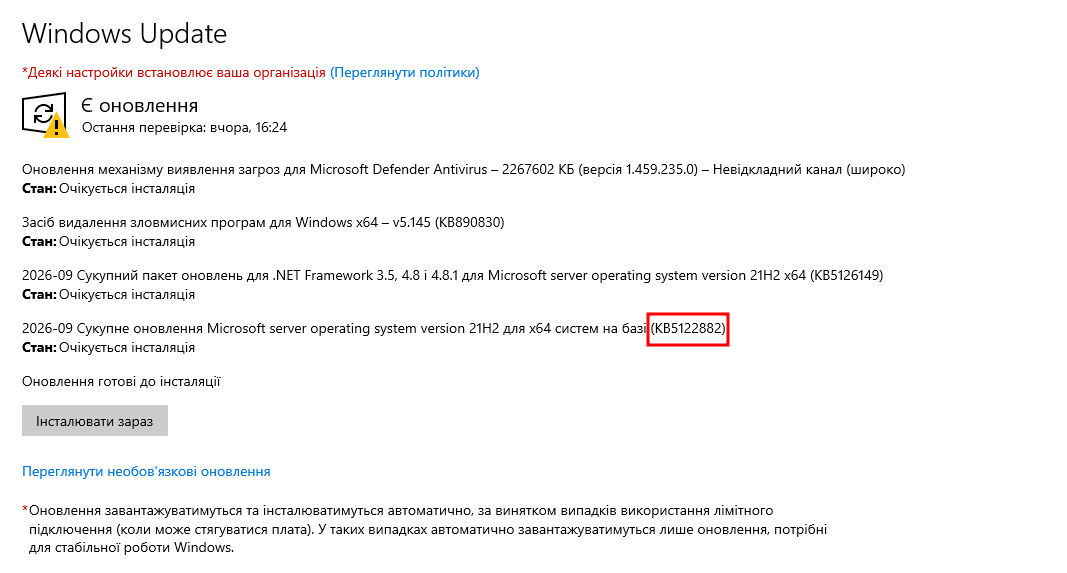
The September cumulative security update KB5122882 for Windows Server 2022 (build 20348.5622) contains a regression in Remote Desktop Services. Microsoft confirms the issue on the Windows Server 2022 release health page. It is not limited to Windows Server 2022:
| Version | Affected update |
|---|---|
| Windows Server 2019 | KB5122876 |
| Windows Server 2022 | KB5122882 |
| Windows Server 2025 | KB5122871 |
The table above lists only the versions for which the affected update number is known. Microsoft notes that the defect also affected Windows Server 2016, 2012 R2 and 2012; their out-of-band fixes are in the table below.
Reports of the failure came in simultaneously from many unrelated organisations around the world.
The fix: an out-of-band update
On 14 September Microsoft released out-of-band updates that fix the regression:
| Version | Fix | Target build |
|---|---|---|
| Windows Server 2019 | KB5129238 | 17763.9247 |
| Windows Server 2022 | KB5129237 | 20348.5631 |
| Windows Server 2025 | KB5129235 | 26100.33451 |
| Windows Server 2016 | KB5129239 | 14393.9514 |
| Windows Server 2012 R2 | KB5129243 (Monthly Rollup) | — |
| Windows Server 2012 | KB5129244 | — |
Important. The updates are cumulative and already include everything from the September package. There is no need to remove the affected update first, and it is not recommended: rolling it back would also remove the security patches.
For Windows Server 2025 with hotpatch enabled there is a separate option: update KB5129241 requires KB5124008 from 8 September to be installed and applies without a restart.
The fix usually does not arrive via Windows Update. Download it manually from the Microsoft Update Catalog; the KB5129237 page links to the packages.
How to install it, step by step

1. Check the current build
(Get-ItemProperty 'HKLM:\SOFTWARE\Microsoft\Windows NT\CurrentVersion').UBRIf Server 2022 shows 5622, you are on the affected version.
2. Install with DISM, not the standard installer
This is practical advice from our own experience. The standard installer wusa.exe can hang in the preparation stage on an affected server and not move for hours. That is exactly what happened to us: the processes sat at zero load and the CBS log stopped growing.
The more reliable route is to extract the package and install it with DISM:
mkdir C:\INSTALL\kb5129237
expand -F:* "C:\INSTALL\windows10.0-kb5129237-x64_HASH.msu" C:\INSTALL\kb5129237
dism /Online /Add-Package /PackagePath:"C:\INSTALL\kb5129237\Windows10.0-KB5129237-x64.cab" /NoRestart
Gotcha. DISM does not accept an .msu file directly and returns error 0x80070032. You need the .cab extracted from it with expand. Another quirk: the progress bar may freeze at a few percent (3% and 5.6% for us) and then jump straight to a success message. That is normal.
3. Restart and check the result
Make sure the system is waiting for a restart:
Test-Path 'HKLM:\SOFTWARE\Microsoft\Windows\CurrentVersion\Component Based Servicing\RebootPending'Do not postpone the restart for long. Until then the fix does not apply: in our case the server hung again while the package was already installed and waiting for the restart.
After startup the system finishes applying the package on the boot screen, which can take 10 to 20 minutes. Do not interrupt it. Then check:
(Get-ItemProperty 'HKLM:\SOFTWARE\Microsoft\Windows NT\CurrentVersion').UBR
Get-HotFix -Id KB5129237
The build should become 5631. And most importantly: test new connections, not reconnection to existing sessions. The failure only showed on new logons and logoffs.
4. Confirm the defect is gone
After a few hours with users on the server, count 7011 events since the last boot:
$boot = (Get-CimInstance Win32_OperatingSystem).LastBootUpTime
Get-WinEvent -FilterHashtable @{LogName='System'; Id=7011; StartTime=$boot} -ErrorAction SilentlyContinue | Measure-Object
Zero events and a qwinsta that answers instantly mean the fix works. On our server A there were 13 events 7011 in the three minutes of the morning failure before the update, and not one in the 20 hours after booting on build 5631.
A temporary workaround if you cannot update right now
Microsoft also released a Known Issue Rollback via Group Policy. For Windows Server 2022 it is the policy with ID 260911_18471, applied under Computer Configuration, Administrative Templates. In essence it turns off the same feature flag we saw in the disassembly.
It is a workaround. Admins on Microsoft Q&A have reported the problem returning after applying KIR 260911_18471. That is another argument for installing the out-of-band update rather than relying on the policy.
If you can install the out-of-band update, do: it is more reliable. Those who have already applied the policy can install the fix on top of it with no extra steps.
What we took away from it
A symptom that migrates between services is a reason to suspect a common denominator. When one subsystem hangs, then another, and each is healthy on its own, the answer is not in them.
A second identical failure on an independent system is worth more than a dozen tested hypotheses. That is what moved us from guessing to the right answer.
Before digging into configuration, check recent updates. We got there on day two, and could have in the first hour. Matching the time of the first failure against the update installation log would have been enough.
Automatic dump collection during a failure is worth half an hour of setup. A simple script that checks system responsiveness every 30 seconds and takes dumps at the first sign of a hang gave us a precise answer where two days of manual testing gave only theories. We wrote about basic monitoring that catches such things before users do in a separate article.
Cumulative updates on terminal servers should not go in on the first night. After the incident we switched Windows Update to manual on one of the servers: updates still get installed, but in a planned window and after checking the known issues.
FAQ
How do I quickly tell whether I have this exact problem?
Two checks. Look at the system build: for Server 2022 the affected one is 20348.5622. Then check the System log for 7011 events from NlaSvc and iphlpsvc coming in pairs 30 seconds apart. If both match, it is the same case.
Can I just uninstall the affected update?
Technically yes, but you should not. The rollback removes all September security patches, including fixes for critical vulnerabilities. The out-of-band update is cumulative: it installs on top and contains everything you need.
Does the problem affect ordinary workstations?
The symptom appears on servers with the Remote Desktop role. Microsoft also released out-of-band updates for client versions of Windows, but there were no widespread complaints of workstations hanging. If RDP broke on a workstation, we have a separate guide: restoring RDP after a Windows 11 update.
How long does installing the fix take?
The DISM installation itself takes 20 to 40 minutes, plus a restart with the package finishing on the boot screen, another 10 to 20 minutes. Plan a window of about an hour and warn users in advance.
Why did a restart only help for a while?
Because the defect fires when sessions end. After a restart the server works normally until the first session teardown fails. The more users, the sooner that happens. In our case the interval shrank from a day to one minute after startup.
Can I reproduce this analysis myself?
Yes. You need procdump from Sysinternals and the cdb console debugger from Debugging Tools for Windows. Take a dump with procdump64.exe -accepteula -ma <PID> dump.dmp, open it with cdb.exe -z dump.dmp -y "srv*C:\symbols*https://msdl.microsoft.com/download/symbols", then ~*k shows the stacks of all threads. The graphical WinDbg from the Microsoft Store does not ship cdb; you need the SDK component.
Which Windows Server versions are affected?
Confirmed affected updates are known for Windows Server 2019 (KB5122876), 2022 (KB5122882) and 2025 (KB5122871). Microsoft also notes impact on Windows Server 2016, 2012 R2 and 2012, and out-of-band fixes were released for them too. The defect shows on systems with the Remote Desktop role: that is where the session teardown path containing the regression is used.
Does KB5129237 fix the problem for good?
Yes. It is not a workaround but a fix to the code itself: the update removes the unbounded wait from the session teardown routine. It is cumulative, so it also contains all September security patches. After installation Server 2022 should be on build 20348.5631. On both servers we support, the failure has not recurred since the update.
Is the Known Issue Rollback policy enough?
As a temporary measure, yes: it turns off the same feature flag we saw in the disassembly. But it is not a code fix, only a switch that disables the faulty branch, and there are reports of the failure returning after applying the KIR. If you have a restart window, install the out-of-band update: it is more reliable and needs no ongoing policy maintenance.
If you are seeing the same thing
We support terminal servers, virtual infrastructure and business networks in Odesa and across Ukraine, and work with clients abroad remotely. If your RDS host behaves as described here, get in touch: we will point you in the right direction or take the work on.
The check takes a minute. Look at your build number and the 7011 events in the log. If the symptoms match, you have the same case, and the fix already exists.
Sources
Microsoft Support — KB5129237 (OS Build 20348.5631), out-of-band update for Windows Server 2022
Microsoft Learn — Windows Server 2022 release health and known issues
Our own analysis of TermService, SessionEnv and UmRdpService dumps captured on 16.09.2026 between 11:04 and 11:06, and monitoring logs (IT Master)